Getting Started with OutRun 2
Controls, modes, branching routes, and a first-hour plan for new drivers.
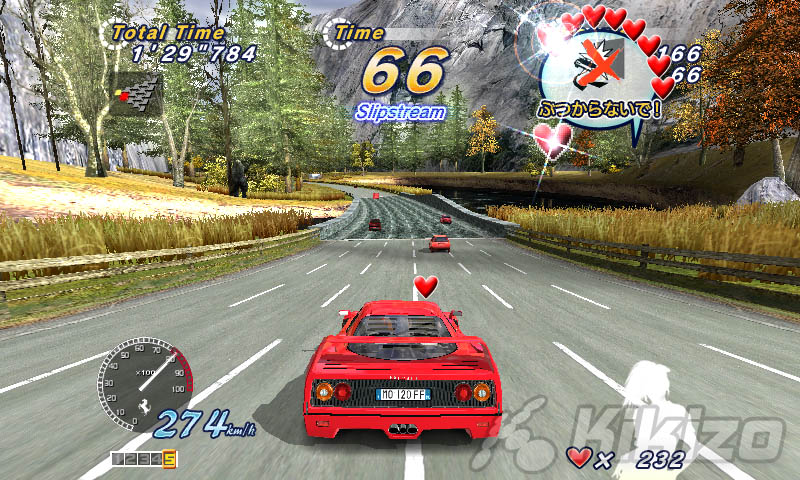
OutRun 2 is Sega AM2’s landmark sequel to the classic OutRun arcade racer. The Chihiro arcade cabinet launched in December 2003, and Sumo Digital brought a rich Xbox conversion in October 2004 with exclusive Challenge content. Whether you boot the original Xbox disc, play through Xbox 360 backward compatibility, or pick up OutRun 2006: Coast 2 Coast on another platform, the core fantasy is the same: drive licensed Ferraris across a branching map of fifteen stages toward one of five Goals, keep the timer alive, and look stylish while you do it.
This guide is your onboarding hub. It covers default Xbox controls, how the main modes fit together, how left and right forks change difficulty, and a practical first-hour plan so you spend time learning drift and route choice instead of menu confusion. When you need deeper technique, jump to How to Drift and Heart Attack Mode. For unlocks and passwords, keep Codes bookmarked. Car feel varies a lot across the roster, so pair this page with the Ferrari Roster and the Tier List once you start chasing Goal E.
Default Xbox controls
These are the standard Xbox race controls most players learn first. Controllers and Coast 2 Coast ports may remap slightly, but the verbs stay the same.
- RT — Accelerate
- LT — Brake
- Left stick — Steer
- Gear up / gear down — Shift when Manual transmission is selected
- Change view — Cycle camera perspectives
- Photo / Snap Happy — Capture a shot during Snap Happy Challenge missions
- Start — Pause and options
Before a run you choose Automatic or Manual transmission. Automatic is friendlier while you learn stage layouts and the basic brake-and-gas drift. Manual unlocks gear-shift drifting, which holds more speed through corners once your timing is solid. Treat Automatic as training wheels for the first hour, then switch to Manual on courses you already know.
Modes at a glance
OutRun Arcade is the classic coin-op experience: start from Palm Beach, beat the timer through a chain of stages, and pick left or right at each fork. Completing a full route to a Goal is the heart of the game. Heart Attack keeps the same branching map, but passenger Clarissa issues timed stunt requests inside Start–End zones. You farm hearts instead of only chasing a finish. Time Attack is pure practice against the clock or ghosts. On Xbox, OutRun Challenge adds 101 missions with cards, party modes, and Gallery unlocks—see Challenge Missions for progression versus Gallery passwords.
Coast 2 Coast bundles OutRun 2 and OutRun 2 SP content plus extras on PS2, PSP, Xbox, and PC. If you are setting up a modern PC install, read Play OutRun 2 on PC after you finish this page.
Branching routes: fifteen stages, five Goals
The map is not a single highway. From the opening stretch you repeatedly choose a fork. Left forks are generally easier; right forks are generally harder. Harder paths demand cleaner drifts, tighter timing, and better car control, but they are where high scores and bragging rights live. There are fifteen stages in total arranged so that different fork sequences lead to five distinct Goals (A through E in common community shorthand).
Your first sessions should deliberately take left forks until you can finish a full run without burning the timer. Then start forcing right forks on stages you recognize. Use the Course Map when you want a visual of how stages connect. Memorizing one complete easy route and one ambitious hard route is more valuable than randomly clicking forks every race.
Drift in one paragraph
The fundamental OutRun 2 drift is: approach a corner, release the accelerator, tap brake, turn hard, then re-apply gas to hold the slide. On Manual you can instead downshift and upshift quickly to start a gear drift with less speed loss. Do not hold every corner as a long, slow slide—over-drifting kills exit speed. Details, timing windows, and class differences live on How to Drift. Spend your first practice hour on a familiar early stage repeating the same corner until initiation feels automatic.
First-hour plan
- Create a profile and set options. Confirm vibration, camera, and transmission. Start on Automatic.
- Run OutRun Arcade on an easy left-fork route. Focus on finishing, not style. Learn when the timer extends at checkpoints.
- Drill one corner for ten minutes. Use Time Attack or repeated Arcade restarts. Practice release-brake-turn-gas until the rear steps out on command.
- Switch to Manual on that same stage. Attempt gear drifts on medium corners only; keep Automatic habits as a fallback if you spin.
- Play one Heart Attack run. Ignore perfect grades. Learn how Start–End request zones look and how Clarissa’s prompts read. Then open Heart Attack Mode for request types and scoring.
- Peek at Challenge. Clear a few early mission cards so you understand mission types (race, photo, party). Do not dump Gallery passwords yet unless you only want gallery browsing—earning cards teaches the physics better. Cross-check unlock lists on Codes.
- Pick a car and stick with it for a session. Handling differs across the Ferrari lineup. After you can finish Goal A-style easy routes cleanly, compare cars on the Ferrari Roster and Tier List.
Common beginner mistakes
Holding drift forever. Long slides look cool and lose races. Exit early, straighten, and accelerate.
Ignoring the timer. OutRun punishes sightseeing. If a fork choice strands you on a hard stage you cannot clear yet, restart and take the easier branch.
Jumping straight to Goal E paths. Right-side difficulty spikes will demoralize you before drift timing clicks.
Spamming Gallery codes on day one. Passwords unlock content instantly, but they skip the teaching loop built into Challenge stages. Use them when you are stuck or collecting, not as a substitute for learning.
Never opening Heart Attack. The mode trains precision passing, lane control, and drift timing under prompts—skills that transfer back to Arcade score runs.
Where to go next
After one solid hour you should finish at least one full easy Arcade route, initiate drifts without panic, and understand what Heart Attack is asking for. Next deep dives: How to Drift for gear technique and when not to slide; Heart Attack Mode for request types and romantic endings; Challenge Missions for the 101 Xbox missions; Course Map for route planning; Codes for Gallery passwords; Ferrari Roster and Tier List for car choice. If your hardware is a modern PC, finish with Play OutRun 2 on PC.
OutRun 2 rewards calm repetition more than button mashing. Learn one route, one car, and one drift initiation, then expand. The coastline is long—drive it with style.
Frequently Asked Questions
Quick answers for OutRun 2 players.
What are the default OutRun 2 Xbox driving controls?
RT accelerates, LT brakes, the left stick steers, dedicated buttons shift up and down on Manual, another button cycles the camera, and the photo button is used for Snap Happy missions.
Should new players use Automatic or Manual transmission?
Start on Automatic to learn stages and the basic brake-and-gas drift. Switch to Manual once you can finish easy routes, so you can practice gear-shift drifts that hold more corner speed.
Are left forks really easier than right forks?
Yes. On the branching fifteen-stage map, left forks are generally easier and right forks harder. Learn easy Goal routes first, then push into harder right-side paths.
What should I play in the first hour?
Finish one easy OutRun Arcade route, drill drift on a single corner, try Manual briefly, sample Heart Attack once, and clear a few early Challenge cards before relying on Gallery passwords.
Where do Gallery unlock codes go?
On Xbox Challenge, open the Gallery and use Enter Code. Full password lists and redemption notes live on the Codes page.